
The Profit You’re Losing (And Don’t Even See)
A client asks, “Can we just move that outlet a few feet?”
It sounds harmless. A quick adjustment. Maybe 20 minutes of labor.
But here’s what actually happens on most job sites:
The crew spends 2 hours rerouting wiring. Materials are used. The supervisor adjusts scheduling. Nobody documents it properly. The client forgets. You absorb the cost.
Now multiply that by 2–3 undocumented changes per project.
According to the Construction Management Association of America (CMAA), change orders can account for 6–10% of total contract value on construction projects. Yet contractors consistently fail to bill a significant portion of them due to poor documentation and slow approval processes.
That’s not just inefficiency. That’s margin erosion.
If you’re managing change orders manually through paper forms, texts, or verbal agreements you’re likely leaking revenue without realizing it.
This guide will show you exactly how to stop it.
What Is a Construction Change Order and Why Does It Matter for Your Margin?
A construction change order is a formal modification to the original contract whether that’s a change in scope, cost, or schedule.
But in practice? It’s often the line between profit and loss.
It starts small: add one extra light, upgrade this tile, shift that wall slightly. If these aren’t documented and approved before the work begins, they quietly consume your margin.
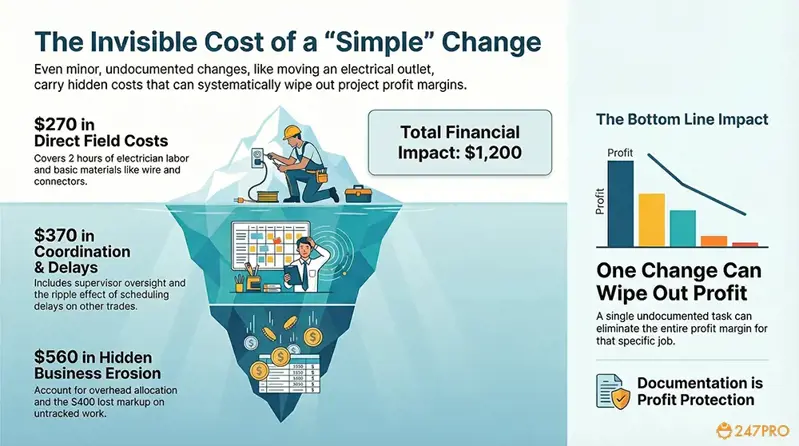
Real Example: How a “Simple” Outlet Move Costs $1,200+
This example illustrates how even a minor change can significantly erode your project’s profit when it’s not formally tracked:
| Item | Cost |
| 2 hours electrician labor | $180 |
| Supervisor oversight (reviewing, coordinating) | $120 |
| Materials (wire, box, plate, connectors) | $90 |
| Scheduling delay impact on other trades | $250 |
| Overhead allocation (truck, insurance, admin) | $160 |
| Lost markup opportunity (work done at cost) | $400 |
| Total real impact | $1,200+ |
One undocumented change = wiped-out profit on that task.
Managing change orders effectively isn’t administrative busywork. It’s how experienced contractors protect their bottom line.
Stop absorbing costs on undocumented changes
247PRO’s change order tool calculates cost impact automatically and tracks every scope change from request to invoice
Common Change Order Mistakes That Cost Contractors Thousands
Mistake #1: Relying on Verbal Agreements
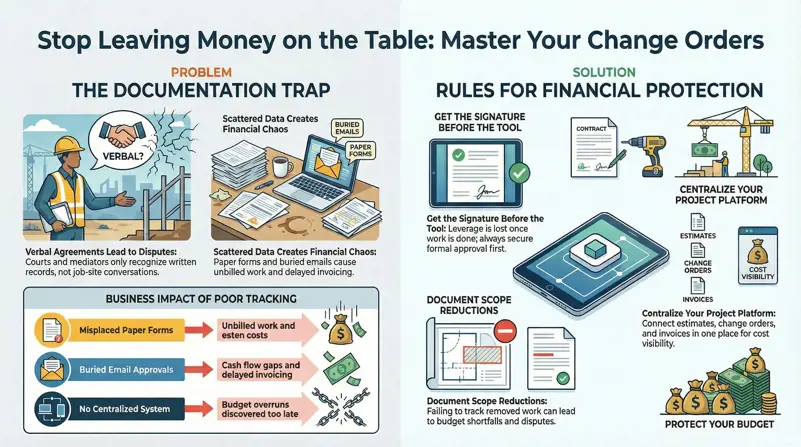
Verbal agreements are the fastest path to a dispute.
When a client says “I thought that was included” and you say “No, that was extra,” without written approval, you’ve already lost leverage.
Courts and mediators don’t recognize job-site conversations. They recognize documentation. Every change no matter how small needs a written record with a signature before the work begins.
Mistake #2: Using Paper Forms, Emails, and Text Messages
Scattered documentation creates chaos. Here’s what typically happens when change order tracking isn’t centralized:
| What Happens | Business Impact |
| Paper change order form gets misplaced | Unbilled work — you eat the cost |
| Email approval buried in inbox | Delayed invoicing, cash flow gap |
| No deadline set for client signature | Weeks of indecision, schedule slips |
| No centralized tracking system | Budget overruns discovered too late |
| No integration with invoicing or accounting | Revenue leakage — work done, never billed |
When change order tracking isn’t centralized, you lose cost visibility. And when you lose cost visibility, overruns are inevitable. This is where a centralized project management platform becomes essential one that connects your estimates, change orders, invoices, and work orders in one place.
Mistake #3: Not Tracking Scope Reductions
Change orders aren’t just for additions. When a client removes scope (“Actually, skip the tile backsplash”), that needs documentation too. Without it, you may face unexpected budget shortfalls or disputes about what was and wasn’t included in the final price.
Mistake #4: Doing the Work Before Getting Approval
This is the most expensive mistake of all. Once the work is done, your leverage is gone. The client may refuse to pay for work they didn’t formally approve and legally, they’re often right. Always get the signature before picking up the tool.
How to Write a Change Order That Gets Signed Fast
If you want fast approvals, your change order document must eliminate friction. The more professional and complete it is, the faster clients sign.
Essential Elements of a Professional Change Order
Every change order you send should include these six elements:
| Required Element | Why It Matters |
| Detailed Description | Clearly explains what’s changing — prevents “I didn’t agree to that” disputes |
| Cost Adjustment | Exact dollar amount with line-item breakdown — builds trust and transparency |
| Schedule Impact | Does this add days? Delay other trades? — motivates faster approval |
| Authorized Signatures | Both contractor and client sign — creates legal enforceability |
| Issue Date + Expiration Date | Prevents open-ended approvals — creates urgency |
| Reference to Original Contract | Links back to specific contract section being modified |
Download Change Order Template
⬇️ Construction_Change_Order_Template-www.247pro.com.pdf
Setting Deadlines That Speed Up Client Approval
Want faster signatures? Use this approach:
The 3-Step Fast Approval Method
1. Set a 3–5 day approval window. State it clearly on the document.
2. Add a hold clause: “Work will not proceed on this change until this document is signed.”
3. Show schedule impact immediately. When clients see that delay affects their completion date, approval time drops dramatically.
With digital change orders, approval time drops from days to minutes. Clients can review and sign directly on their phone no printing, scanning, or mailing required.
Construction Profit Margin Management: Protecting Your Bottom Line
The real profit in construction isn’t in the initial estimate. It’s in how you manage what happens after the contract is signed.
Here’s the reality: net profit margins in construction are thin. Residential remodelers typically operate at 8–12% net margin, general contractors at 3–5%, and specialty trades at 5–8% (source: CFMA Annual Financial Survey). At those margins, even a few undocumented changes can erase your entire profit on a project.
Calculating Your “Revenue Leakage”
Revenue leakage happens when work is performed but never invoiced. Think of it like small holes in a ship one is manageable, but twenty will sink you.
Here’s a conservative calculation:
The Revenue Leakage Formula
If your team loses just 2 unbilled hours per week collectively:
• 2 hours × $75/hour average labor value = $150/week
• $150 × 52 weeks = $7,800/year
• With a 5-person crew, this could mean $15,000–$40,000 in annual revenue leakage
Note: The actual amount depends on how many changes go undocumented. Even at the low end, $7,800/year is significant for a small contractor.
Accurate initial estimates (built with tools like 247PRO’s construction estimator) reduce the chance of unplanned changes. But when changes do happen — and they always do — you need a system to capture every one.
How much profit are you losing to undocumented changes?
247PRO tracks every change order in real time from request to approval to invoice. No more absorbed costs.

Strategic Change Orders: Turning Scope Changes into Revenue Opportunities
Most contractors see change orders as a hassle. But experienced contractors see them differently:
Change orders are controlled upsells.
When positioned correctly with professional documentation and transparent pricing, scope changes become revenue opportunities rather than profit killers. Here’s the mindset shift:
| Amateur Approach | Professional Approach |
| "I’ll just add it in, no big deal" | "I’ll document this change with a formal CO" |
| Verbal agreement, no paper trail | Digital CO with cost breakdown and signature |
| Absorbs extra work to “keep the client happy” | Presents change transparently — client respects professionalism |
| Discovers cost overrun at project end | Tracks budget impact in real time |
| Argues about payment after the fact | Invoices automatically upon CO approval |
When you present a change order with a clear cost breakdown, clients understand the value. They’re not paying for "extra" — they’re paying for a specific modification they requested. Transparency builds trust, and trust builds repeat business.
Pro tip: If you’re also using
247PRO’s material schedule, material costs for change orders are pulled automatically no manual lookups needed.
How Real-Time Cost Tracking Prevents Project Overruns
There are two ways to discover a cost overrun:
Without real-time tracking: You find out at the end of the project when it’s too late to recover the cost.
With real-time tracking: You see the impact of every change instantly budget vs. actual, approved vs. pending, and the running effect on your margin.
Real-time visibility prevents financial surprises. When you can see that your project is 12% over budget after just 3 change orders, you can adjust pricing on the next change or have a proactive conversation with the client instead of absorbing the loss silently.

The Modern Change Order Workflow: From Phone to Invoice in Minutes
Here’s what a fully digital change order process looks like in practice:
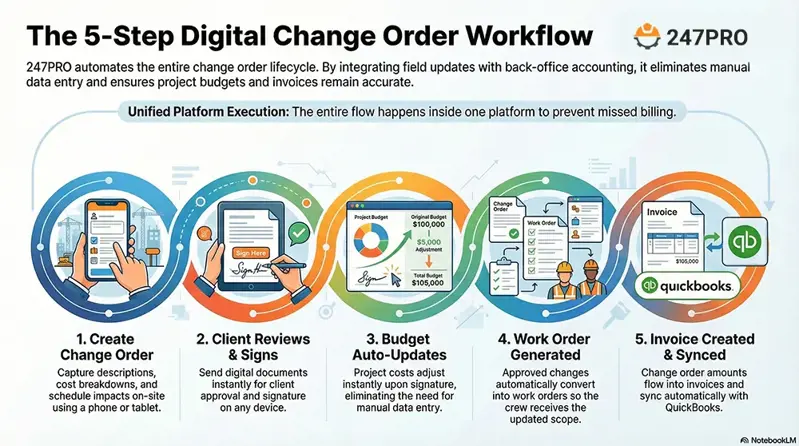
With 247PRO, this entire process happens inside one platform:
Step 1: Create Change Order: On your phone or tablet, right on the job site. Add description, cost breakdown, and schedule impact.
Step 2: Client Reviews & Signs: Send to client instantly. They review and sign digitally — on their phone, their computer, anywhere.
Step 3: Budget Auto-Updates: The moment it’s signed, your project budget adjusts automatically. No manual entry.
Step 4: Work Order Generated: The approved change converts into a work order for your crew. Everyone knows exactly what changed.
Step 5: Invoice Created & Synced: The change order amount flows into your next invoice and syncs with QuickBooks. No missed billing. No double entry.
Minutes. Not days. That’s the difference between a contractor who manages change orders and a contractor who gets managed by them.

Manual vs. Digital: Side-by-Side Comparison
Still on the fence about switching from paper? Here’s how the two approaches compare:
| Aspect | Manual Process | 247PRO Digital |
| Change order creation | 30–60 min (handwritten or Word doc) | 5 min (pre-built templates, auto-fill) |
| Client approval time | 3–7 days (mail, email, chase) | Same day (digital signature on phone) |
| Budget impact visibility | Unknown until project end | Instant — real-time dashboard |
| Invoicing | Manual re-entry, often missed | Auto-generated from approved CO |
| Document storage | Filing cabinet or scattered emails | Cloud-based, searchable, permanent |
| Dispute protection | "He said, she said" | Timestamped, signed digital record |
| QuickBooks sync | Manual entry | Automatic |
| Cost per year (5-person team) | $15K–$40K in leakage | Starting at $0/month (free tier) |
247PRO offers a free Starter plan with core features included so there’s no financial risk to try it. Paid plans start at $34.30/month (billed annually), which is significantly less than competitors like Buildertrend ($99+/mo) or CoConstruct ($99+/mo).
The Change Order Best Practices Checklist
Use this checklist for every change order on every project:
Change Order Excellence Checklist
⬇️ Download Link: the-change-order-best-practic.pdf
☐ 1. Document every change request in writing no exceptions
☐ 2. Include a detailed scope description and cost breakdown
☐ 3. Calculate and show the schedule impact
☐ 4. Set a 3–5 day approval deadline with a hold clause
☐ 5. Get authorized signatures BEFORE starting any work
☐ 6. Update the project budget immediately upon approval
☐ 7. Generate a work order for the crew with updated scope
☐ 8. Create an invoice line item and sync with accounting
☐ 9. Track approved vs. pending changes on a central dashboard
☐ 10. Review change order patterns at project close-out to improve future estimates
Pro tip: Track your change order patterns over time. If you’re consistently seeing changes in electrical or plumbing rough-ins, that’s a signal to adjust your initial estimates to account for these common modifications. The best change order system isn’t just reactive it feeds back into your estimating process.
When a Change Order Requires Additional Resources
Sometimes a change order triggers the need for additional resources an extra dumpster for demolition debris, a portable toilet for an extended timeline, or specialty equipment.
With 247PRO’s built-in Marketplace, you can order dumpster and portable toilet rentals directly from your project dashboard (currently available in the Bay Area, expanding nationally). No phone calls, no separate vendors, no lost receipts. The cost is tracked automatically within the project.
This is a feature no other construction project management software offers.
Don’t Leave Your Profit to Chance
Construction change orders will always happen. The question isn’t whether they’ll come it’s whether they’ll increase your revenue or silently erode your margin.
Contractors who systemize their change order process protect profit. Contractors who rely on memory, paper, and verbal agreements absorb the loss.
Take Control of Your Change Orders Today
Start your 14-day free trial and see how 247PRO automates the entire change order workflow from creation to client signature to invoice.
Start Free Trial Change Order ➡️
Frequently Asked Questions
How do I know which minor changes will actually impact my project budget?
Not every small request affects profit equally. The key is to track three things for each change: materials required, labor hours, and schedule impact on other trades. Even a seemingly small request can trigger a chain reaction like the $1,200 outlet example above. A digital change order system calculates the real cost impact instantly, so you can make informed decisions about which changes need formal documentation.
What’s the fastest way to get client approval without losing profit?
Set clear approval windows (3–5 days), communicate the schedule impact visually, and offer digital signatures so clients can approve on their phone. When clients see that their delay affects the completion date and potentially triggers additional costs, approval time improves dramatically. 247PRO’s digital change orders have reduced average approval time from days to same-day for most users.
How can I prevent lost revenue from subcontractor or team miscommunication?
Manual communication channels (texts, WhatsApp, email) create gaps where changes fall through. Centralized change order software logs every adjustment in one place, shows who approved what and when, and eliminates “he said, she said” problems. When a change order is approved in 247PRO, it automatically generates a work order for the relevant crew or sub.
Can documenting deletions or scope reductions also protect my profit?
Absolutely. Change orders aren’t just for additions. Recording scope reductions maintains transparency, prevents disputes about what was included in the original price, and avoids unexpected budget shortfalls. If a client removes a tile backsplash, document it otherwise you may face arguments about credits at final payment.
How do I turn frequent small changes into revenue opportunities?
When properly documented with professional formatting and transparent pricing, minor changes become legitimate upselling opportunities. Instead of absorbing a $200 change to keep the client happy, present a professional change order that shows the value of the work. Clients respect transparency, and you maintain your margin.
What are the hidden costs if I delay submitting a change order?
Delays compound risk in four ways: labor hours are absorbed without billing, schedule slips may trigger penalty clauses, materials may be wasted or need reordering, and cash flow is impacted because you can’t invoice for unapproved work. Real-time tracking eliminates these hidden costs by keeping the approval process moving.
How can I measure the financial impact of untracked changes over time?
Start by tracking two numbers: unbilled hours per week and change order approval time. Even 1–2 unbilled changes per month can add up to thousands per year. Use a reporting dashboard or the revenue leakage calculator (download above) to identify patterns. Over time, this data feeds back into your estimating process, making your initial bids more accurate